Javascript, "bind", and "this"
All javascript functions have access to an implicit
argument this. By default, this refers to the global
window object, but when a function is bound to an object as a
method, this refers to the object.
function testThis() {
    return this === window;
}

testThis(); // true

var obj = {
    testThis: function () {
        return this === obj;
    }
};

obj.testThis(); // true
However, it is possible to dynamically call functions with a new value bound
to this by using the Function.prototype.call
and Function.prototype.apply methods. Call takes arguments
individually, while apply takes them as an array.
function alertMsg(message) {
    return alert(this + message);
}

alertMessage.call("Hello, ", "World!"); // alerts "Hello, World!"

alertMessage.apply("Goodbye, ", ["cruel world!"]) // alerts "Goodbye, cruel world!"
But, often it is helpful to permanently bind the scope
of this for a function. This technique was first pioneered
by Prototype.js. At its most basic,
the function bind will take two arguments: the first is an object
that will be bound as this for the function that is the second
argument.
// Useful for making the "arguments" object a true array and also for creating a
// copy of an existing array.
function toArray(obj) {
    return Array.prototype.slice.call(obj);
}

// Bind in its simplest form

function bind(scope, fn) {
    return function () {
        return fn.apply(scope, toArray(arguments));
    };
}

// Examples

var dog = {
    noise: "Ruff!"
};
var truck = {
    noise: "Honk!"
};

function makeNoise() {
    return this.noise;
}

makeNoise(); // undefined
bind(dog, makeNoise)(); // "Ruff!"
bind(truck, makeNoise)(); // "Honk!"

var noise = "<Douglas Crockford puking in disgust>";
makeNoise(); // "<Douglas Crockford puking in disgust>"
It is also possible to write bind such that it curries your
function as well. For a more detailed description of currying in Javascript,
check
out this article by Angus Croll.
// Bind w/ currying

function bind(scope, fn /*, variadic args to curry */) {
    var args = Array.prototype.slice.call(arguments, 2);
    return function () {
        return fn.apply(scope, args.concat(toArray(arguments)));
    };
}

// Bind w/ currying examples

function convert(ratio, input) {
    return (ratio * input).toFixed(1) + " " + this.unit;
};

var pounds = {
    unit : "lbs"
};
var kilometers = {
    unit: "km"
};

var kilosToPounds = bind(pounds, convert, 2.2);
var milesToKilometers = bind(kilometers, convert, 1.62);

kilosToPounds(2.5); // "5.5 lbs"
milesToKilometers(13); // "21.1 km"
It is possible to implement somewhat Pythonic iterators using a combination
of bind and Array.prototype.shift. Iterators provide
a cleaner, more elegant API for looping over the items in an array than the
typical for-loop could.
// A specific iterator

var item,
    iterZeroToNine = bind([0, 1, 2, 3, 4, 5, 6, 7, 8, 9],
                          Array.prototype.shift);

// Log each of the integers in the range 0 - 9
while (item = iterZeroToNine()) {
    console.log(item);
}

// A generic iterator generator

function iter(arr) {
    var items = toArray(arr); // Also makes a copy
    return bind(items, Array.prototype.shift);
}
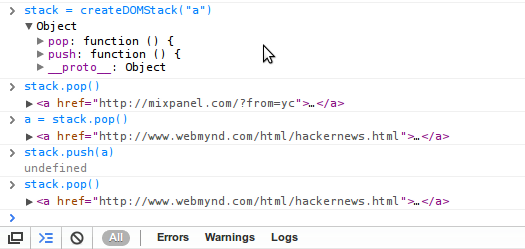
The synthesis of closures and bind provides a powerful tool for
abstracting and hiding implementation details. Consider the following code,
which implements a rudimentary stack data type for DOM nodes.
function createDOMStack(selector) {
    var elts = toArray(document.querySelectorAll(selector)),
        pushToElts = bind(elts, Array.prototype.push);

    return {
        push: function (item) {
            if (item instanceof HTMLElement)
                pushToElts(item);
            else
                throw new Error("Can only push DOM elements to this stack!");
        },
        pop: bind(elts, Array.prototype.pop)
    };
}
Its also worth noting that a native version of bind with currying will
be available as Function.prototype.bind once ECMAScript
5 is widely implemented by the browser vendors. For more information see
the WebKit ticket,
and Mozilla
ticket.